
Construction daily log software
Construction Daily Log Software for Contractors
The Daily Log in Rental Leak is a jobsite daily log for contractors: the record of what happened on a project each day — work performed, crews on site, weather, deliveries, delays, equipment and photos. Nobody writes a daily report at the end of the shift. The superintendent, foremen and office add short entries through the day, and the day’s log is those entries together, with the project’s rental activity added for you. It is included on every plan.
30-day free trial • No credit card required • Web, iOS and Android
What goes in
One short entry at a time
Pick what you are adding, fill in the one or two fields it has, and save. Several people can add to the same day.
- Work performed
- Crew on site, with headcount
- Weather and conditions
- Deliveries
- Delays and issues
- Equipment notes
- Photos, up to six per entry
- Rental activity, logged automatically
Why daily logs get skipped
A daily report nobody has time to write
It is written at the end of the day
By the time someone sits down to write the report, half the detail is gone. Short entries added as things happen keep it.
It lives in one person’s notebook
A log on paper or in one person’s spreadsheet can’t be read by the office until it is typed up again.
Rental activity is copied by hand
What was delivered, called off or picked up already exists somewhere else. Retyping it into a daily report is where it goes missing.
Photos end up in text threads
A photo of a delivery or a delay is only useful later if it is attached to the day and the project it belongs to.
Issues are noted, then forgotten
A delay written into a report doesn’t assign anyone to do anything about it.
Nobody can find last month
When a question comes up about a day weeks ago, the answer is in a folder of files named by date.
How it works in Rental Leak
A project log the whole team adds to
Open a project and choose Add on the Daily Log line. An entry is one thing: a line of work performed, a crew and its headcount, the weather, a delivery, a delay, an equipment note, or a photo. Crew is a headcount for the record, with hours if you want them — it is not timekeeping or payroll — and weather is entered by hand.
Rental activity appears by itself. When a rental on the project is added, called off rent, returned or transferred to another job, or a delivery or pickup ticket is attached to it, the Daily Log shows it on that day. That is the part of a daily report most contractors retype from memory, and it comes from the same rental management the rest of Rental Leak is built on.
If something needs doing, open the entry and choose Create follow-up task. The task is created in Tasks with the project already filled in, so a delay in the log becomes an action item with a person and a due date.
Use the arrows to move between days, or pick any day in the last year. Export PDF creates a printable copy of one day; photos are not included in the PDF. Everyone on the team can read the log and add to it from the web, iPhone or Android, which is how a job stays visible across every jobsite without a phone call.
That is the difference from a stand-alone daily report app. The Daily Log is one part of Rental Leak’s construction management software: it sits on the same project as the rentals, the tasks and the owned equipment, so the day’s record and the follow-up it leads to stay together.
Example
One day on a project, as the log shows it
The day reads like a daily report, in the order a superintendent would write one. Each section appears only when it has something in it.
- Weather & conditions — Clear, 48°F. Frost on the slab until 8, dry after.
- Crew on site — Our crew, 6 people, 8 h. Solid Concrete, 4 people: foreman and 3 finishers.
- Work performed — Formed and poured footings for Building C. Backfilled the east utility trench.
- Equipment & rentals — Mini excavator (rented): not being used, parked since Tuesday. 60 ft boom lift (rented): moved to Building C. Rental activity such as an off-rent request or a delivery ticket appears here by itself.
- Deliveries — Rebar for Building C footings from Pacific Steel Supply, staged at the north gate.
- Delays & issues — Inspector moved the footing inspection to Monday, 2 h lost. Follow-up task: Reschedule the Building C footing inspection.
- Photos — up to six on a work, equipment, delivery or delay entry, or a photo entry of its own.
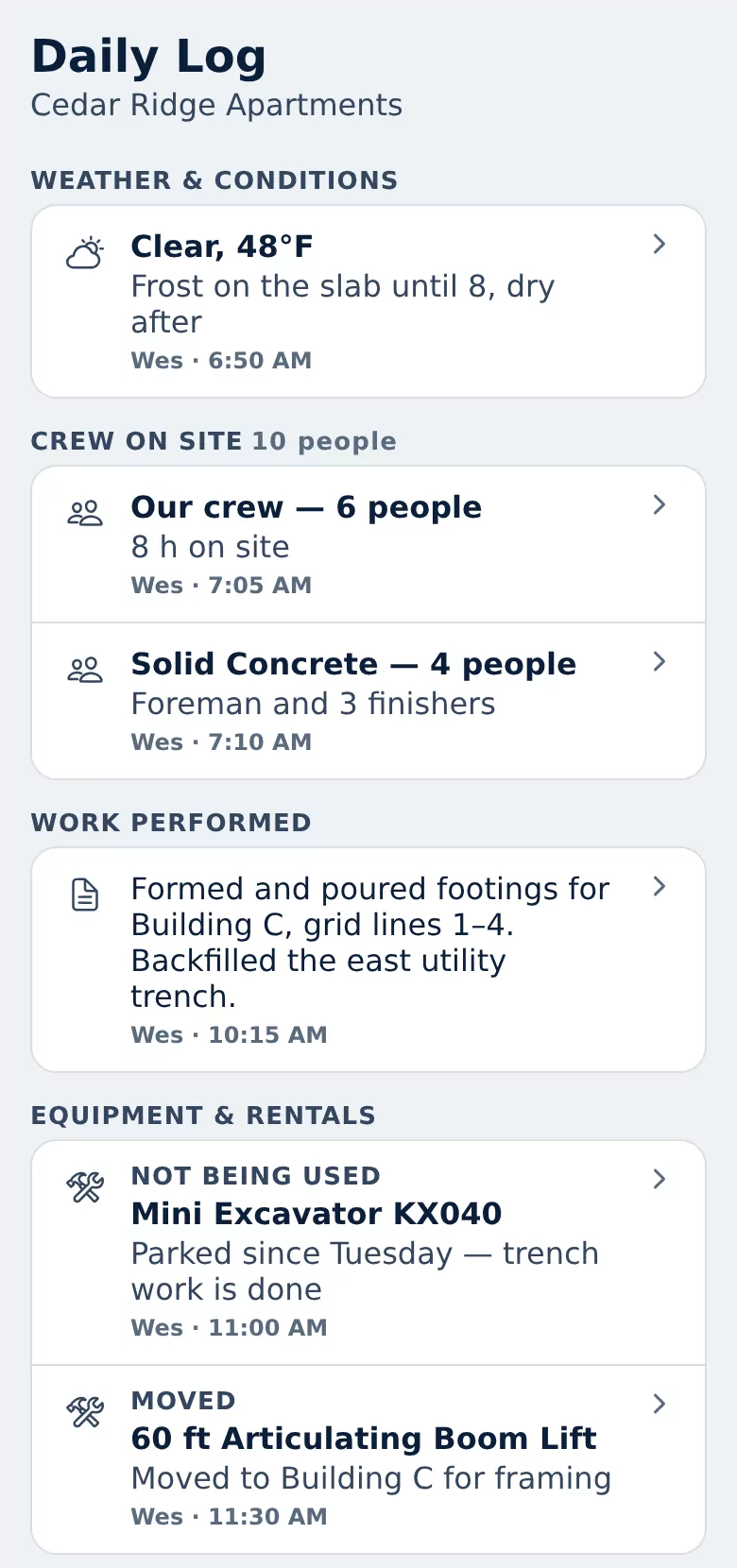
The start of that day in the phone app, shown with sample company data.
Equipment on the log
What the field sees about rented equipment, on the record
The person on site is the first to know a rented machine is sitting idle or broken down. An Equipment entry puts that on the record against the rental itself.
Tied to the rental
Pick one of the project’s rentals and what happened: not being used, damaged or down, moved, serviced, picked up, or vendor contacted. Equipment that isn’t a rental can be described in words instead.
Seen on the rental too
Entries about a rental also appear on that rental’s page, so whoever decides whether to keep it sees “not being used” next to the rate and the next billing date.
Billing steps stay separate
Logging a pickup does not mark the rental returned. Requesting off-rent and marking it returned are their own recorded steps in off-rent and return tracking.
Field and office
A daily report for the superintendent, a record for the office
Written from the jobsite
Entries are added from a phone as the day goes, with up to six photos on an entry. A missed entry can still go on yesterday or an earlier day; it is filed without a clock time rather than an invented one.
Subcontractor crews included
A crew entry names the crew or company — your own crew, the concrete sub, the electrician — with the number of people on site and hours if you want them.
Readable from the office
Owners and project managers open any project and any day in the last year without calling the site, and export a day to PDF when someone needs a printed copy.
What it is and is not
Deliberately simple
A record, not a form
An entry is a few fields, not a multi-page daily report. There is no submit or sign-off step.
Entries can’t be edited
The person who wrote an entry can remove it for 24 hours, and an owner or manager can remove any entry. The log shows that an entry was removed and by whom.
It never changes a rental
Nothing in the log changes a rental’s status, dates or cost, so the log can’t change what you are being billed for.
Not timekeeping
Crew entries are a headcount for the record. Rental Leak does not do payroll, timesheets or certified payroll.
On every plan
The Daily Log is included on Starter, Contractor and Pro, for every user on the team.
Rental paperwork has its own place
Delivery and pickup tickets for a rental belong in Tickets & Receipts on that rental, where they can be used during invoice review.
Common questions
Is the Daily Log included on every Rental Leak plan?
Yes. The Daily Log is included on Starter, Contractor and Pro, and every user on the team can read it and add entries.
Can several people add to the same day?
Yes. Field and office users add short entries through the day, and the log for that day is all of those entries together.
Can a superintendent use it for the daily report?
Yes, as the record of the day: work performed, crews and headcount, weather, deliveries, delays with time lost, equipment and photos, with Export PDF for a printable copy of one day. There is no sign-off or submit step, and it does not do timesheets, inspections or safety forms.
Can I add an entry for yesterday or an earlier day?
Yes. Choose Yesterday or another day when you add the entry. An entry for an earlier day is filed on that day without a clock time, because Rental Leak does not invent one.
Does the daily log pull in equipment rental activity?
Yes. When a rental on the project is added, called off rent, returned or transferred, or a ticket is attached to it, the Daily Log shows that on the day it happened.
Can I export a daily log?
Yes. Export PDF creates a printable copy of the selected day. Photos are not included in the PDF.
Can a daily log entry be edited afterwards?
No. An entry cannot be edited. The person who wrote it can remove it for 24 hours, an owner or manager can remove any entry, and the log shows that an entry was removed.
Keep reading
Related
Construction task management
Action items by project, with one person, a due date and a history.
See tasks →Construction rental management software
Everything Rental Leak does for rentals, from the agreement to the invoice.
See the overview →Rental tracking across jobsites
One rental list for the field and the office, organized by project.
Track every jobsite →Off-rent and return tracking
From the off-rent request to the pickup, with every step recorded.
Track returns →Spreadsheet alternative
What changes when the rental log stops being a spreadsheet.
Compare →How to find forgotten rental equipment
A walk-through for finding rentals nobody is using.
Read the guide →Keep each day on the record without writing a report
30 days free, no credit card required. New trials include Pro features for the full 30 days. Plans start at $59/month after that.