Construction task management
Construction Task Management for Contractors
Tasks in Rental Leak keep construction action items from getting lost between the field and the office. Each task has a title, the project it belongs to, one person it is assigned to, a due date and a priority. Field users see their own work first — what is overdue, what is due soon and everything open — and owners and managers see the overdue work across every project. Tasks are included on every plan.
30-day free trial • No credit card required • Web, iOS and Android
What a task is
One action item, one person
A task is small on purpose. It is the thing that has to happen, who is doing it, and by when.
- A title
- A project
- One assigned person
- A due date
- Normal or High priority
- Comments
- A linked rental or owned machine, when it is about one
- A full activity history
Why action items get lost
The list that lives in a text thread
Nobody owns it
An item raised in a meeting or a group text belongs to everyone, which usually means no one.
There is no due date
Without a date there is no such thing as overdue, so nothing ever surfaces by itself.
It is on a different list per job
Each project has its own spreadsheet or notebook, so nobody can see what is late across the company.
Nobody knows it was done
The person who asked finds out it was handled only by asking again.
The context is somewhere else
“Call off the lift” is only useful next to which lift, on which job, from which vendor.
History disappears
When a line is deleted from a list, so is the record of who asked, who did it and when.
How it works in Rental Leak
Work that comes to the person who has to do it
Choose New task from Operations, from a project or from a rental. A task started from a project is filed under that project, and one started from a rental is linked to that rental and its project, so the person doing it can open the rental directly. The person it is assigned to gets a notification on their phone.
To finish a task, tap the circle beside it in any task list. It is marked complete, and Undo is shown for a few seconds in case it was a slip. The person who created the task is told when someone else completes it. Open a task to add a short comment or see its activity: who created it, who it was assigned to, due date changes, comments, and who completed it and when. A completed task can be reopened.
Tasks sit on the same projects as your rentals. An item such as returning a boom lift can be linked to that rental, next to its vendor, rate and next billing date — the detail equipment rental tracking already holds. Completing the task does not change the rental: requesting off-rent and marking it returned stay their own recorded steps, which is what keeps off-rent and return tracking accurate.
A follow-up can also start in the field. From an entry in the project Daily Log, Create follow-up task opens a task with the project already filled in, so a delay written down at 2 p.m. has an owner before the end of the day.
Repairs work the same way. On a machine your company owns, Create service task opens a task linked to that equipment, so “fix the hydraulic leak on the loader” has a person and a due date instead of living in a text thread. Completing it doesn’t change the machine’s status; sending it to service and back stays its own step in owned equipment management.
That is the difference from a stand-alone to-do app. Tasks are one part of Rental Leak’s construction management software, so an action item sits on the same project as the rentals, the equipment and the daily log it is about, and nobody has to describe the job or the machine from scratch.
Field and office follow-up
Task tracking for the field and the office
The same tasks, seen two ways: the person doing the work sees what is theirs, and the office sees what is late on every job.
In the field: my work
Home shows each person how many of their tasks are overdue or due soon, and Operations lists them as Overdue, Due soon and Open. A new assignment arrives as a notification on their phone, and one tap on the circle completes it.
In the office: overdue across the team
Owners and managers see every overdue task on every project in one list, and each project with its open, overdue and unassigned counts. Projects with overdue work are listed first.
On the project: its own list
Each project shows its open and overdue task counts next to its rentals and Daily Log, with a quick way to add one. The task list can be narrowed to my tasks or everyone’s, filtered by due date, project and assignee, and searched.
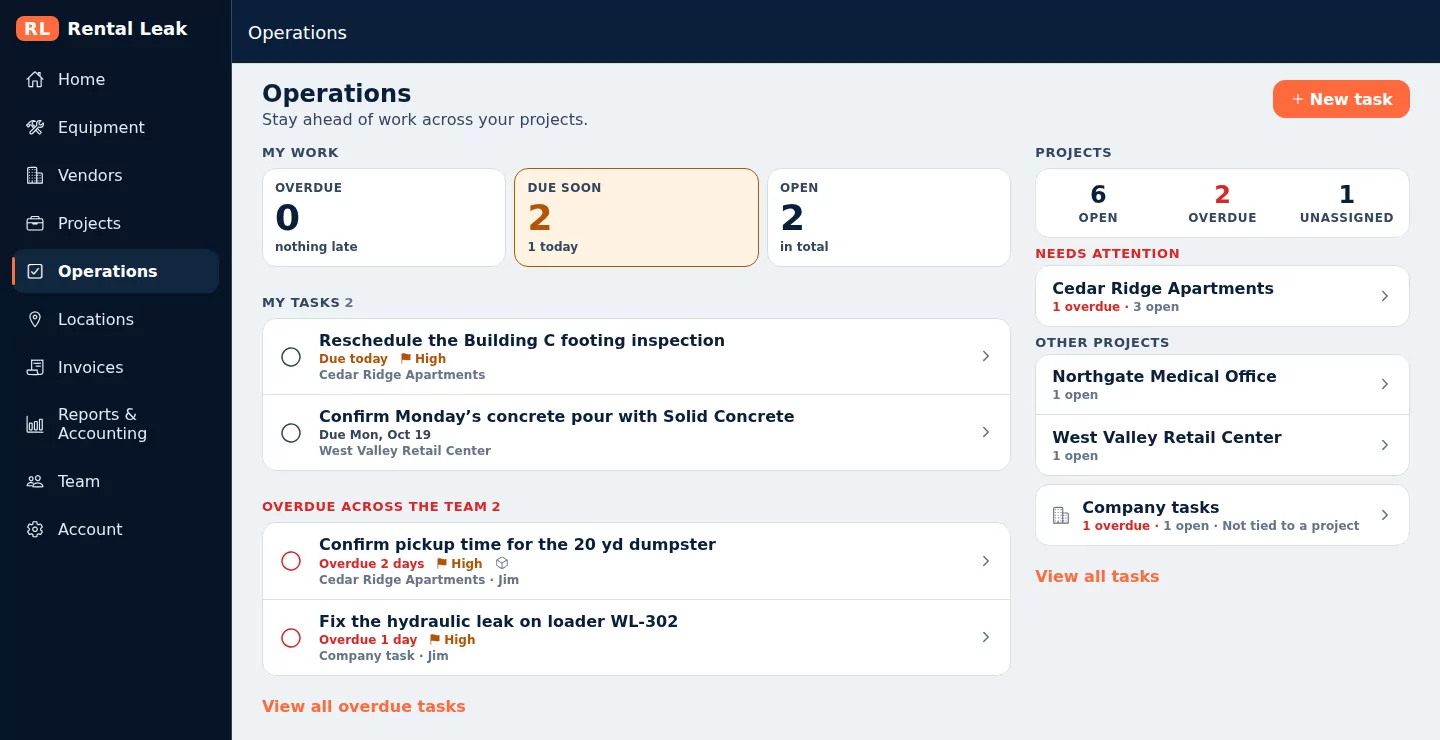
Operations in the Rental Leak web app, shown with sample company data.
Examples
What contractors track as tasks
Most construction action items are about something specific. A task can start from the thing it is about, so that context comes with it.
“Call off the 40 yd dumpster”
Started from the rental. The task is linked to the dumpster and its project, so whoever has it can open the vendor, the rate and the next billing date. The off-rent request itself is still recorded on the rental.
“Fix the hydraulic leak on loader L-12”
Started from a machine your company owns with Create service task. The repair has a person and a due date, and the machine’s own status and history stay on the machine.
“Call the locator about the utility conflict”
Started from a delay in the project’s Daily Log with Create follow-up task. The log entry shows its follow-up task and whether it is still open, so the reason for the task stays on the record.
What it is and is not
Action items, not a scheduling system
Not a Gantt chart
There are no dependencies, critical paths or resource levelling. A task is something a person needs to do.
One person per task
A task is assigned to one person so it is always clear who has it. Unassigned tasks can be completed by anyone on the team.
Overdue comes first
Lists are ordered from real dates: overdue work first, then what is due soon. There is no score and nothing to configure.
Clear permissions
Everyone on the team can see tasks, create one and comment. Changing a task is for the person who created it or an owner or manager, and only an owner or manager can delete one.
Nothing is lost
A deleted task keeps its history and can be restored. A project that has tasks can be archived but not deleted.
On every plan
Tasks are included on Starter, Contractor and Pro, on the web, iPhone and Android.
Common questions
Are tasks included on every Rental Leak plan?
Yes. Operations and Tasks are included on Starter, Contractor and Pro.
Can a task be assigned to more than one person?
No. A task is assigned to one person so it is always clear who is responsible. A task can also be left unassigned.
Does completing a task change a rental?
No. A task can be linked to a rental, but completing it never changes the rental. Requesting off-rent and marking a rental returned are separate steps.
Can field users create and complete tasks?
Yes. Everyone on the team can see the company’s tasks, create a task and comment. A task can be completed by the person it is assigned to, the person who created it, or an owner or manager.
How do I see overdue tasks across all my projects?
Owners and managers see Overdue across the team on the Operations screen, and every project with its open, overdue and unassigned counts, with the projects that have overdue work listed first. The full task list can be filtered by due date, project and assignee.
Is the person assigned a task notified?
Yes. The person a task is assigned to gets a notification on their phone, and the person who created it is told when someone else completes it. Comments and due dates do not send notifications.
Is a punch list item the same as a task?
No. A punch list item is something physical to fix on site, with a location and before and after photos, and it moves from open to ready for review to complete. A task is any other action item. Both sit on the same project, on every plan.
Does Rental Leak have Gantt charts or schedules?
No. Tasks are action items with a person and a due date. Rental Leak does not do Gantt charts, dependencies or project scheduling.
Keep reading
Related
Construction daily log
Work, crew, weather, deliveries, delays and photos by project and day.
See the Daily Log →Construction rental management software
Everything Rental Leak does for rentals, from the agreement to the invoice.
See the overview →Off-rent and return tracking
From the off-rent request to the pickup, with every step recorded.
Track returns →Rental tracking across jobsites
One rental list for the field and the office, organized by project.
Track every jobsite →Construction equipment management
Owned machines by status, project and location, with service tasks and history.
See owned equipment →How to call off rental equipment
A call-off checklist that keeps each step on the record.
Read the guide →Give every action item a person and a date
30 days free, no credit card required. New trials include Pro features for the full 30 days. Plans start at $59/month after that.